Accounting and tax
Accounting on the Moroccan chart of accounts, fed by your sales, purchases and documents
Accounting on the Moroccan chart (CGNC): journals, general ledger, trial balance, income statement and balance sheet. Your invoices, payments and documents become posting proposals, validated by you or your firm before the general ledger.
Demo on request · Pricing on request · Guided setup
Accounting often starts with retyping
Invoices in Word, purchases in an Excel workbook, documents sent in a heap to the accounting firm.
- Every invoice and every payment is entered a second time for the books
- Output and input VAT are rebuilt by hand at the end of each period
- Gaps between sales management and the accounts show up too late
Posting proposals drawn from your transactions
Sales invoices, payments, credit notes, goods receipts, supplier invoices and confirmed documents become posting proposals. Your accountant (or you, with in-house accounting) validates them before the general ledger, one by one or in bulk. Every entry balances, debit equal to credit, and stays linked to its source document.
The same transaction is never posted twice. If an entry cannot be posted, for example because a VAT account is missing or the period is locked, it is rejected as a whole rather than half recorded.
- CGNC journals: sales (VT), purchases (AC), bank (BQ), cash (CA) and miscellaneous (OD)
- Manual entry of miscellaneous transactions
- Gap-free piece numbers per journal and fiscal year (VT-2026-000123), given at validation
- Locking of finished periods and year-end closing
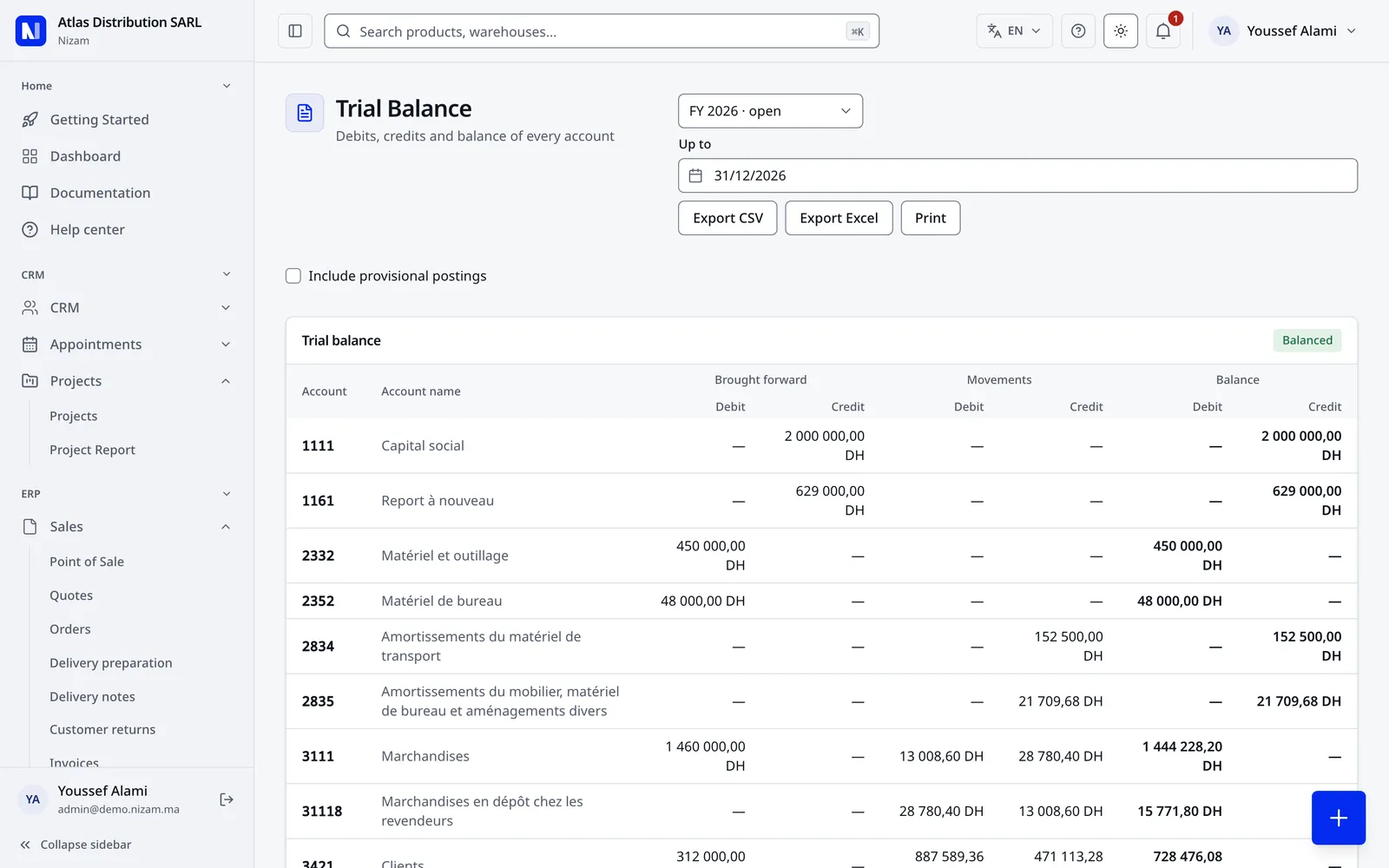
Ledger, trial balance, CPC and balance sheet
You can view the statements built from your validated entries at any time, and, if you wish, from proposals still pending. They are working documents: your accountant remains responsible for the financial statements and tax returns.
- General ledger, account by account, with matching (lettrage)
- Six-column trial balance
- Income statement (CPC, compte de produits et charges)
- Balance sheet (bilan)
VAT, deadlines and controls prepared from your entries
The accounts feed VAT return preparation, the calendar of your tax and social deadlines, cash payment controls and the preparation of the payment-terms statement (law 69-21). Each result is a preparation, to be validated by your accountant.
Exports for your accountant
Exports for your accountant: journals, general ledger, trial balance, the entries file and Sage 100 and Ciel import files. The Sage and Ciel files carry the notice « À confirmer sur un import réel » (to be confirmed on a real import); export batches only take the entries validated since the last batch.
Takeover from your previous software
On activation, take over your chart of accounts, opening balances and entries from your previous software’s files (Sage, EBP, Ciel: FEC, trial balance), to be validated by your accountant. Nizam reads a FEC, a Ciel XIMPORT file, a Sage « format paramétrable » file or a trial balance as CSV or Excel, formats to be confirmed on a real import of your files.
It proposes the mapping of accounts, third parties and journals; the entries taken over are validated in batches by the accounting authority. The formats are still to be confirmed with your accountant.
SIMPL files prepared
On activation, Nizam prepares the deductions statement and the tax return package to be filed on SIMPL, to be validated by your accountant. The boxes Nizam cannot compute are left « to be completed by your accountant », and the formats are still to be confirmed.
In-house or with your firm
Keep your accounts yourself, or hand validation to your accounting firm (accompanied accounting). You invite your firm, choose what it sees and withdraw access whenever you want. Your firm works in your file from its own workspace, Nizam Cabinet.
Built around Moroccan rules
The accounts follow the framework your accounting firm already uses:
- Moroccan general chart of accounts (CGNC) and its journals
- Output VAT (4455) and recoverable VAT (3455) broken down by rate
- 2026 VAT preconfigured: 20%, 10% and exempt
- Amounts in dirhams (DH), exact to the centime
- Source documents carrying your ICE, IF and RC, and your business customer’s ICE
What Nizam does not do
Nizam files nothing on the DGI portals: it prepares the figures and, on activation, the SIMPL files; your accountant checks them and files the returns.
Nizam does not file CNSS returns: payroll is run in the Payroll module (on activation) or by your firm, to which Nizam sends the month’s variable inputs. It does not connect to your bank: you import your statements as PDF, CSV or OFX.
Useful links
- Accompanied accounting with your firm
- Documents to review
- VAT, cash controls and law 69-21
- Tax and social deadlines
- Accounting exports for your accountant
- Bank statements and reconciliation
- Supplier invoices and payments
- Payments, credit notes and receivables
- Payroll: payslips and payroll register
- VAT rates in Morocco
- Nizam and Sage
- Nizam Cabinet, for your accounting firm
Pricing
On request: our pricing depends on your modules, number of users and the support you need.
Frequently asked questions
Does Nizam generate the SIMPL VAT return?
Nizam prepares; it files nothing. It prepares the VAT return (by rate, according to your regime, deduction in the month of payment, reverse charge) and, on activation, the deductions statement and the tax return package to be filed on SIMPL, to be validated by your accountant. The formats are still to be confirmed; your accountant checks the files and figures, then files the return on SIMPL.
Does Nizam replace my accountant or my accounting software?
No. Nizam runs your sales, purchasing, stock and invoices, collects your documents and prepares posting proposals. With accountant-assisted accounting, your accounting firm validates them before they reach the general ledger and receives the exports it needs. Tax returns and financial statements remain your accountant’s responsibility.
Does Nizam follow the Moroccan chart of accounts (CGNC)?
Yes. Nizam’s accounting follows the Moroccan general chart of accounts and its journals (sales, purchases, bank, cash, miscellaneous), with general ledger, trial balance, income statement and balance sheet. Your accountant remains responsible for the financial statements and returns.
Is accounting part of Nizam?
Yes. We set it up when your account is started: accounting follows the Moroccan chart, and your sales, purchases, payments and reviewed pieces become posting proposals. You choose who validates them: you, or your firm in accompanied accounting.
Are entries posted without a check?
No. Your invoices, payments, purchases and confirmed documents become posting proposals. They only reach the general ledger once validated by the accounting authority: your administrators with in-house accounting, your firm with accompanied accounting.
Which exports can I send to my accountant?
Journals, general ledger, trial balance and income statement as CSV or Excel, the entries file, and Sage 100 and Ciel Compta import files, to be confirmed on a real import. Export batches only take the entries validated since the last batch.
Prepare clean accounts with your accounting firm
Book a demo: we switch on CGNC accounting when we set up your account.