Stock linked to sales and purchasing
Multi-warehouse stock linked to your sales
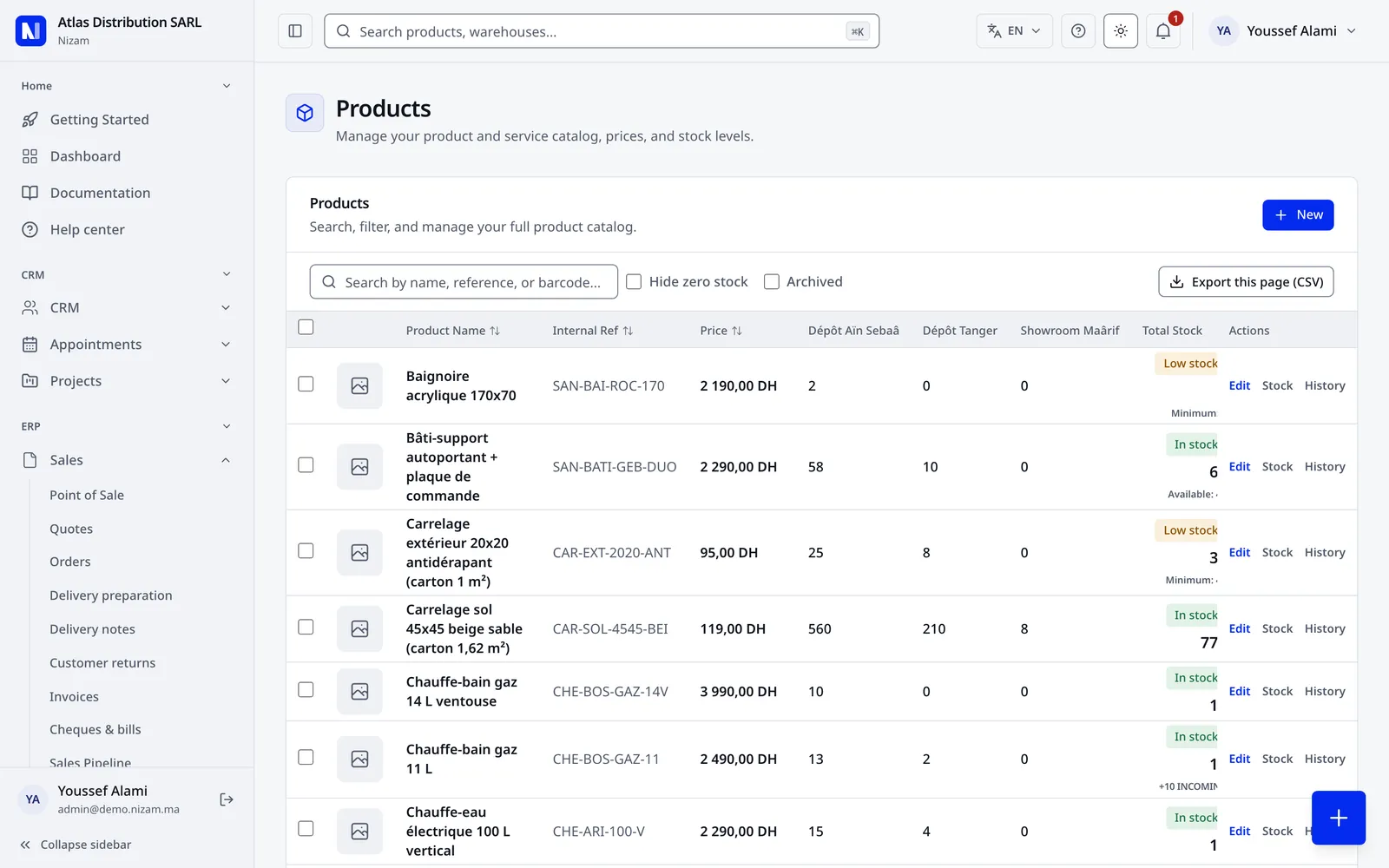
Know what is in stock, reserved, to purchase and delivered, in every warehouse. Every movement comes from a document: supplier receipt, delivery note, transfer or adjustment.
Demo on request · Pricing on request · Guided setup
When stock doesn’t keep up
An item found out of stock with the customer in front of you, overstock tying up your cash: badly tracked stock costs sales and money.
- The stock on screen doesn’t match what is in the warehouse
- The same goods are promised to two customers
- Nobody knows what to order, or when
- Stock-outs discovered at the moment of sale
- Overstock sleeping in the warehouse while other items run short
Stock follows every document
- 1
Create your warehouses and import items from Excel
- 2
Receive supplier goods: warehouse stock goes up
- 3
Confirm a customer order: stock is reserved
- 4
Deliver from the right warehouse: the delivery note takes stock out
- 5
Follow low-stock alerts and valuation per warehouse
A shop and a warehouse? One catalogue
Your items and prices are managed once for all your warehouses, and each warehouse keeps its own stock. Goods moving from one warehouse to another go through a recorded transfer.
The history of receipts, issues, transfers and adjustments lets you trace every movement and the document behind it. Low-stock alerts tell you what to order before you run out.
Inventory tools
Multi-warehouse stock
Receipts, issues, transfers and adjustments traced per warehouse.Purchasing and receipts
Supplier purchase orders, partial receipts, stock updated on receipt.Partial delivery notes
One order delivered in several notes, from one or several warehouses.Quotes and reservations
Stock is reserved once the order created from the quote is confirmed.Invoice what was delivered
Invoices use delivered quantities, not promised ones.Stock at your resellersOn activation
Stock placed with resellers and consignees, declared sales and returns.Alerts and valuation
Low-stock alerts to reorder in time, and stock valuation to know what your inventory is worth.
Excel, Sage or Odoo for your stock?
What each option really brings for stock across several warehouses.
Pricing
On request: our pricing depends on your modules, number of users and the support you need.
Frequently asked questions
Does Nizam manage several warehouses?
Yes. Nizam manages stock across several warehouses or stores. Every receipt, issue, transfer or adjustment is recorded in a movement history. A delivery cannot take out more than the physical stock available, and confirmed orders reserve stock so the same goods are not sold twice.
Can I sell a product that is not in stock yet?
Yes, if the “sell before you buy” option is switched on. The order is confirmed, virtual stock goes negative and Nizam shows the matching purchasing need. Physical stock can never go negative: the delivery stays blocked until the goods are received.
How do supplier purchases and receipts work?
You create a supplier purchase order, optionally subject to approval, then record one or several receipts. Each receipt updates the stock of the chosen warehouse, flags differences and refuses an unauthorised over-receipt. The order moves automatically to “partially received” or “received”.
Does Nizam warn me when stock is low?
Yes. Nizam shows low-stock alerts based on the thresholds you set, plus stock and valuation reports per warehouse. This helps you decide what to order before running out, and purchasing needs from confirmed orders appear when the “sell before you buy” option is on. You can then create the supplier purchase order directly.
Does Nizam handle partial delivery notes?
Yes. You can deliver an order in several delivery notes, from one or several warehouses. Nizam tracks the quantities ordered, delivered and still to deliver on each line, takes stock out on delivery, and lets you invoice only what has been delivered.
Get your stock straight
Import your items and warehouses, then follow every movement. Demo on request.