Invoicing for Moroccan SMEs
Invoicing software that carries the Moroccan mentions
Your legal identifiers (ICE, IF, RC, taxe professionnelle) printed automatically, VAT broken down by rate, gap-free numbering and invoices linked to your quotes and deliveries.
Demo on request · Pricing on request · Guided setup
Invoicing mistakes that cost money
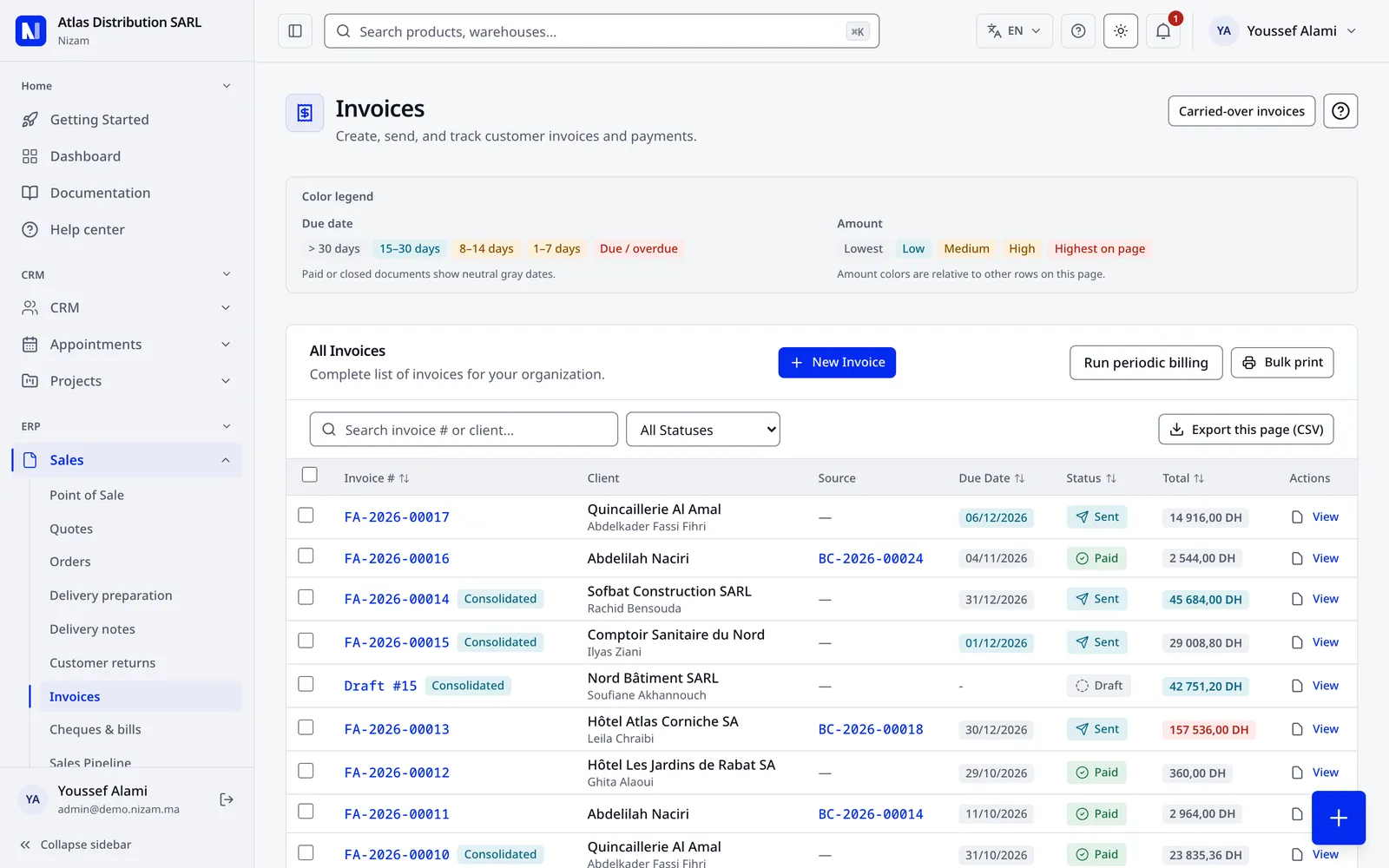
In Word or Excel, every invoice takes time, and every VAT amount recalculated by hand is a chance to get it wrong.
- Invoices missing your legal identifiers or with a wrong VAT breakdown
- Duplicate invoice numbers or gaps in the series
- Invoices that don’t match what was actually delivered
- No way to see at a glance who has paid, who has paid in part and who still needs a reminder
Invoice in five steps
- 1
Enter your identifiers once: ICE, IF, RC, taxe professionnelle, CNSS
- 2
Create a quote or start from an existing order
- 3
Convert it to an invoice: lines, discounts and VAT rates carry over
- 4
Email the PDF invoice from the document
- 5
Record payments, including partial ones, and track balances due
Payments and balances due
Every payment, full or partial, is recorded against its invoice. You see what each customer has paid and what is still due.
This helps you follow payment terms and prepare, with your accountant, the declaration required by law 69-21 for the companies it covers.
For SMEs that invoice other businesses
Wholesalers, distributors, agencies, installers, shops with business customers: your customers expect an invoice with their ICE, correct amounts excluding and including VAT, and VAT broken down by rate. Every mistake costs you reminders and invoices to redo.
Your customer’s ICE, RC and IF are stored on their record and printed on their invoices. You invoice in dirhams, with totals exact to the centime.
What the invoicing module does
Legal mentions and VAT by rate
ICE, IF, RC, taxe professionnelle and CNSS printed; VAT computed per line and summarised by rate.From quote to invoice
An accepted quote becomes an order, then an invoice, with no re-typing.Invoice what was delivered
Partial invoicing from delivery notes, line by line.Negotiated prices applied
Your framework-contract prices apply automatically on every document.Invoices per project
Group quotes, deliveries and invoices for the same operation.Role-based access
Each user sees what they need to see; actions are logged.Invoices that look like you
Professional PDFs with your logo and legal mentions, emailed in one click from the invoice.
Compare invoicing options
Excel, desktop software or a full ERP: what changes for a Moroccan SME.
Pricing
On request: our pricing depends on your modules, number of users and the support you need.
Frequently asked questions
What must an invoice include in Morocco?
Under article 145 of the CGI, an invoice must show: number, date, identity of seller and buyer, tax identifier (IF), taxe professionnelle, trade register (RC), the seller’s ICE and, for a business customer, its ICE, the description, quantity, unit price, total excluding VAT, VAT rate and amount, total including VAT and payment method. (as of 12/10/2026)
Do Nizam invoices include the ICE?
Yes. Nizam automatically prints your legal identifiers on invoices: ICE, tax identifier (IF), trade register (RC), taxe professionnelle (patente) and CNSS, entered once in the company settings. VAT is broken down by rate and numbering is continuous.
How does Nizam number invoices?
Nizam gives each invoice a unique, continuous and chronological number, per company and per year (for example FA-2026-00001). Numbering is locked: two users cannot get the same number, and a cancellation does not create a gap. Quotes, orders and delivery notes have their own series.
What are the VAT rates in Morocco in 2026?
Since the reform started by the 2024 Finance Law and completed in 2026, Moroccan VAT has a standard rate of 20 % and a reduced rate of 10 %, plus exempt transactions. The former 7 % and 14 % rates were abolished. Check the rate for your activity in the CGI or with the DGI. (as of 12/10/2026)
Is e-invoicing mandatory in Morocco?
Not yet for SMEs. Article 145-IX of the CGI allows the DGI to impose it by decree. The DGI has announced a gradual rollout, starting with large companies, but as of 12/10/2026 no implementing decree has been published in the Bulletin officiel. According to the press, SMEs would be concerned around 2027–2028.
Can I send a quote or invoice by email or WhatsApp?
Yes. Nizam generates the PDF and emails it from the document. It also goes out on WhatsApp from the quote or invoice: with your WhatsApp Business account connected, Nizam sends the PDF itself; otherwise it opens WhatsApp with a link to the PDF, for you to send from your own phone. The “sent” status is recorded only once sending has succeeded.
Issue your first invoice today
Moroccan VAT and numbering preconfigured. Demo on request.