Accounting and tax
Export your accounts for your accounting firm
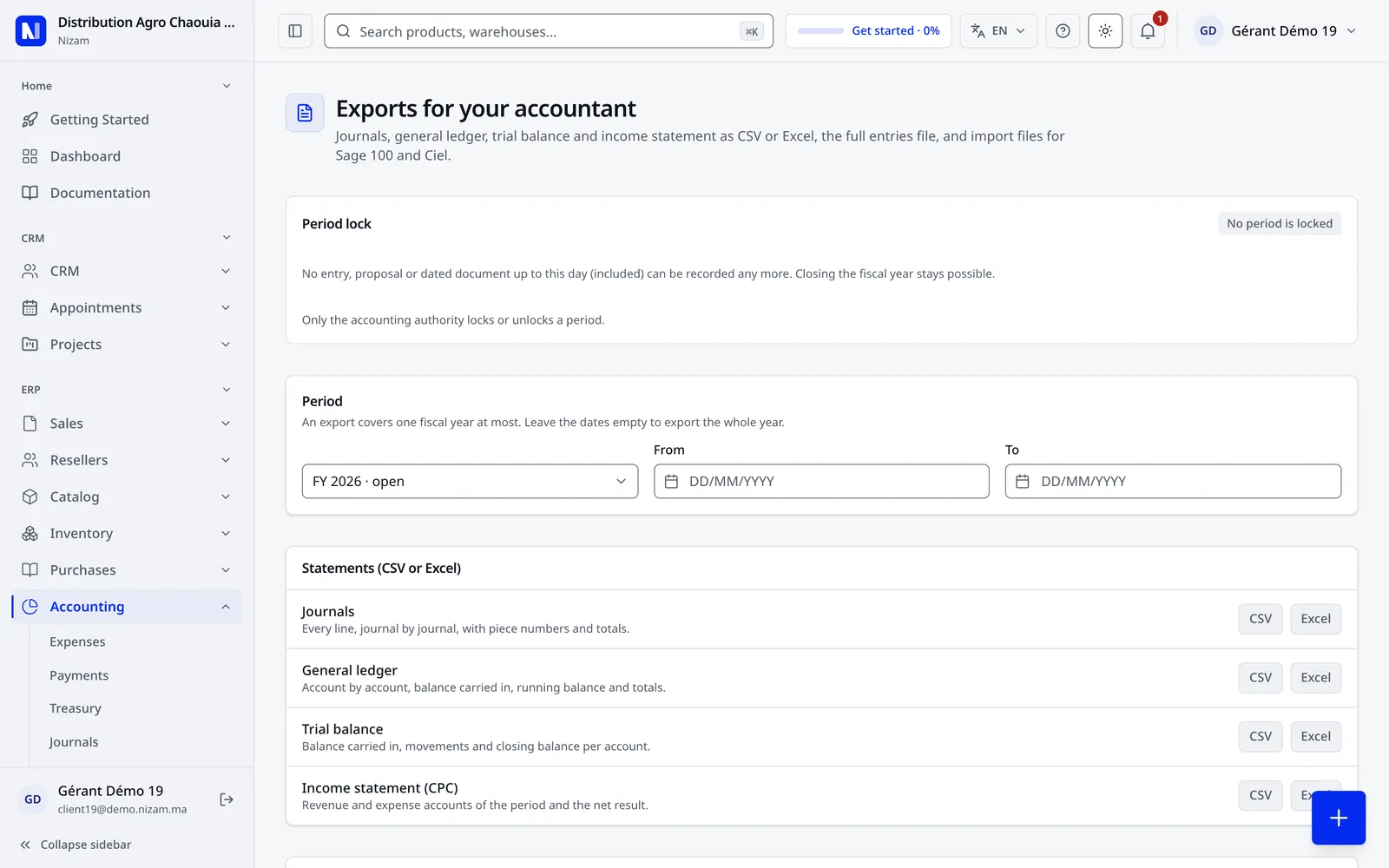
Exports for your accountant: journals, general ledger, trial balance, the entries file and Sage 100 and Ciel import files. A UBL 2.1 copy of your invoices, and all your data whenever you want it.
Demo on request · Pricing on request · Guided setup
Figures that don’t travel from one program to another
Home-made exports, columns rebuilt by hand, entries retyped at the firm.
- The accounting firm retypes entries already posted in your software
- Nobody knows which entries were already sent
- Getting your own data back needs a technical job
Journals, general ledger, trial balance and CPC
For a period of a fiscal year, each statement exports to CSV or Excel: journals, general ledger, trial balance and income statement (CPC, compte de produits et charges). Every download is recorded in the history with its date, period and author.
The entries file and Sage 100 and Ciel import files
The entries file holds every line of the period in 18 columns, as CSV or as a ZIP with a description of the columns. The Sage 100 Comptabilité (« format paramétrable ») and Ciel Compta (XIMPORT) files follow an account and journal mapping you set with your accountant.
Both files carry the notice « À confirmer sur un import réel » (to be confirmed on a real import): have the first import checked in your accountant’s software before relying on it.
- Account and journal mapping, account length, customer and supplier third-party codes
- Arabic labels replaced by the document reference in the Sage and Ciel files, encoded in Windows-1252
- The structure of each file described field by field, to set up the import
Export batches: only the new entries
An export batch takes, by default, the entries validated since the last export, in Sage 100, Ciel or entries-file format. Each batch can be downloaded again unchanged; entries already exported are flagged before a new export. Pending proposals are never included.
A batch in the « FEC (CGI art. 145-I) » format (rule not verified as of 30/10/2026) is also offered for a whole fiscal year. It carries the notice « Format à confirmer » (format to be confirmed) until the matching rule is signed by a chartered accountant: its content is to be validated by your accountant before it is handed over.
A UBL 2.1 copy of your invoices
UBL 2.1 export of your invoices (a structured copy; nothing is transmitted). Each issued invoice or credit note downloads as XML, alone or in a ZIP batch, with seller and buyer (ICE, IF, RC), lines, VAT by rate and totals identical to the invoice.
This file is not an electronic invoice: it is neither signed nor sent to the tax administration or your customer. You send it yourself to a customer or accountant who asks for it.
Your data stays yours
The owner and administrators can prepare a ZIP of all the company’s data at any time, in open formats: a JSON and a CSV file per table with their description, the entries file, document lists and attached files. The download link works once, for 10 minutes.
When a company leaves Nizam or changes accounting firm, the exit archive carries its entries for every fiscal year and its documents. Only the owner and the firm that validates the file can request it.
Pricing
On request: our pricing depends on your modules, number of users and the support you need.
Frequently asked questions
Is Nizam compatible with DGI e-invoicing?
Nizam is ready for e-invoicing (on activation): a UBL XML of each invoice, and checks before issue; sending to the DGI platform will be looked at once its specification is published. As of 14/11/2026 that specification is not published: nothing is sent to the DGI. Invoices are already numbered without gaps and not editable once issued, and we will tell our customers about the timetable that applies to them.
Which files can I hand to my accountant?
Journals, general ledger, trial balance and income statement as CSV or Excel, the entries file, and Sage 100 and Ciel Compta import files. With export batches, you only send the entries validated since the last batch.
Have the Sage 100 and Ciel files been checked?
They are built from the published formats and carry the notice « À confirmer sur un import réel » (to be confirmed on a real import). Set the account and journal mapping in Nizam, then have your accountant check the first import.
Is the UBL 2.1 copy an electronic invoice?
No. It is a structured copy of your issued invoices: nothing is sent to the tax administration or your customer, and the file is not signed. You send it yourself if a customer or accountant asks for it. On activation, Nizam is also ready for e-invoicing: UBL XML, checks, and connection to the DGI platform once the specification is published.
Can I get all my data back?
Yes. The owner and administrators prepare a ZIP of all the company’s data, as JSON and CSV, with the entries file and attached files. Passwords and sign-in secrets are never exported.
Give your accountant clean files
Request a demo of the exports, with your accountant’s account mapping.