Accounting and tax
Your invoices and receipts land in one place, and each one is reviewed before the books
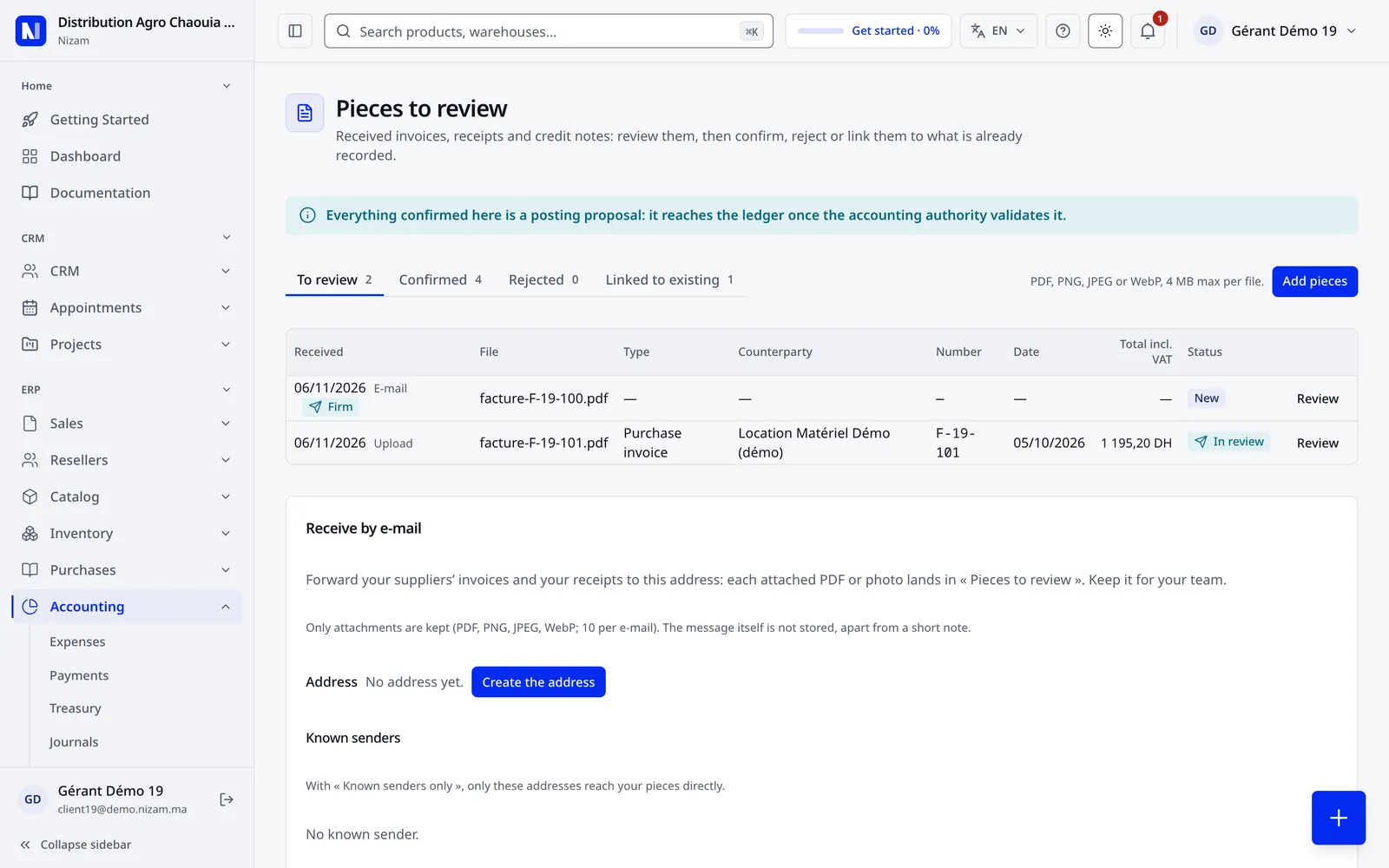
Upload link with a QR code, your company’s own e-mail address, your WhatsApp Business number, Nizam itself (in the browser, on mobile too) or the API: documents arrive in a single queue. Each document is reviewed before it reaches your accounts.
Demo on request · Pricing on request · Guided setup
Documents scattered everywhere
Receipts in a pocket, invoices in an inbox, photos on WhatsApp.
- Nobody knows which documents were sent to the accountant
- The same supplier invoice is entered twice, or not at all
- At month end, the accounting firm chases missing documents
How a document travels
- 1
Your team sends the photo or PDF: upload link, e-mail, WhatsApp, app or API.
- 2
Nizam checks the file and looks for duplicates.
- 3
An authorised person reviews it: type, third party, number, amounts by VAT rate.
- 4
Once confirmed, the document creates the record and a posting proposal.
- 5
Your accountant, or you with in-house accounting, validates the proposal before the general ledger.
Five ways to receive a document
Every channel ends in the same queue, Accounting › « Pièces à revoir » (documents to review). Only the owner and administrators manage the upload link and address.
- Upload link and a printable QR code sheet: the page opens on a phone, in French, Arabic or Darija, with no account to create
- Upload address: an e-mail address of your own company, whose attachments arrive in the queue
- Your own WhatsApp Business number (Meta, 360dialog or Twilio): photos from known senders arrive in the queue
- Upload from Nizam, in the browser of a computer or a phone, as a photo or PDF
- Public API, for the tools that already produce your documents
Duplicates stopped before entry
Before anything is created, Nizam compares the document with those already received and with the invoices already entered: same supplier (ICE or name), same number, a close date, the same total including VAT to the centime. If there is a match, confirmation is refused and you link the document to the existing one: nothing is created twice.
A file identical to one already received is flagged as soon as it is sent.
A review before the books
The review screen shows the received file next to the form. You choose the document type, the third party (by name or ICE), the number, the date, the due date and the amounts by VAT rate; the check « net + VAT = total » must be green to confirm.
Confirming posts nothing to the general ledger: the document creates the supplier invoice, credit note or external sales invoice, and a posting proposal that the accounting authority validates. A document can also be rejected with a reason; tabs keep confirmed, rejected and linked documents.
- Purchase invoice
- Expense (receipt)
- Supplier credit note
- Sales invoice
Automatic reading, as an option
Automatic reading of documents pre-fills the review; nothing is recorded without validation. Each field read carries a confidence level, and reading never creates, confirms or links a document.
An administrator switches it on for your company and sets daily and monthly caps. You can also refuse to have your documents read, even if your accounting firm switched reading on for its clients.
Filtered senders, checked files
On the e-mail address as on WhatsApp, you can accept known senders only: other messages wait in quarantine, where you add them to your documents or delete them.
Every file is checked (type and size). On photos sent through the link, location and device data are removed before storage. The link can be replaced or switched off at any time. Documents received are copies: keep your originals.
Pricing
On request: our pricing depends on your modules, number of users and the support you need.
Frequently asked questions
How does my team send a document?
Through the upload link (or its QR code) opened on a phone, the upload e-mail address of your company, your WhatsApp Business number if you connect it, straight from Nizam (in the browser, on mobile too) or the API. Every document arrives in « Pièces à revoir » (documents to review).
Do documents reach the books without a check?
No. Each document is reviewed and confirmed by an authorised person. It then becomes a posting proposal that your accountant, or you with in-house accounting, validates before the general ledger. Automatic reading, as an option, only pre-fills the review.
What happens if the same invoice arrives twice?
Nizam compares it with the documents received and the invoices entered: supplier, number, date and total. If it already exists, confirmation is refused and you link it to the existing one: nothing is created twice.
Do I need a Nizam account to send a document through the link?
No. The upload link opens without an account, in French, Arabic or Darija. It belongs to your company: you replace or switch it off whenever you want, and documents already received stay in the queue.
Can I receive documents on WhatsApp?
Yes, on your own WhatsApp Business number, connected through Meta, 360dialog or Twilio. You keep your account and contract with that provider. Photos from known senders arrive in the queue; those from unknown numbers wait in quarantine.
Gather your documents before month end
Request a demo: the upload link, the review queue and validation by your accountant, on demonstration documents.