Accounting and tax
The calendar of your tax and social deadlines
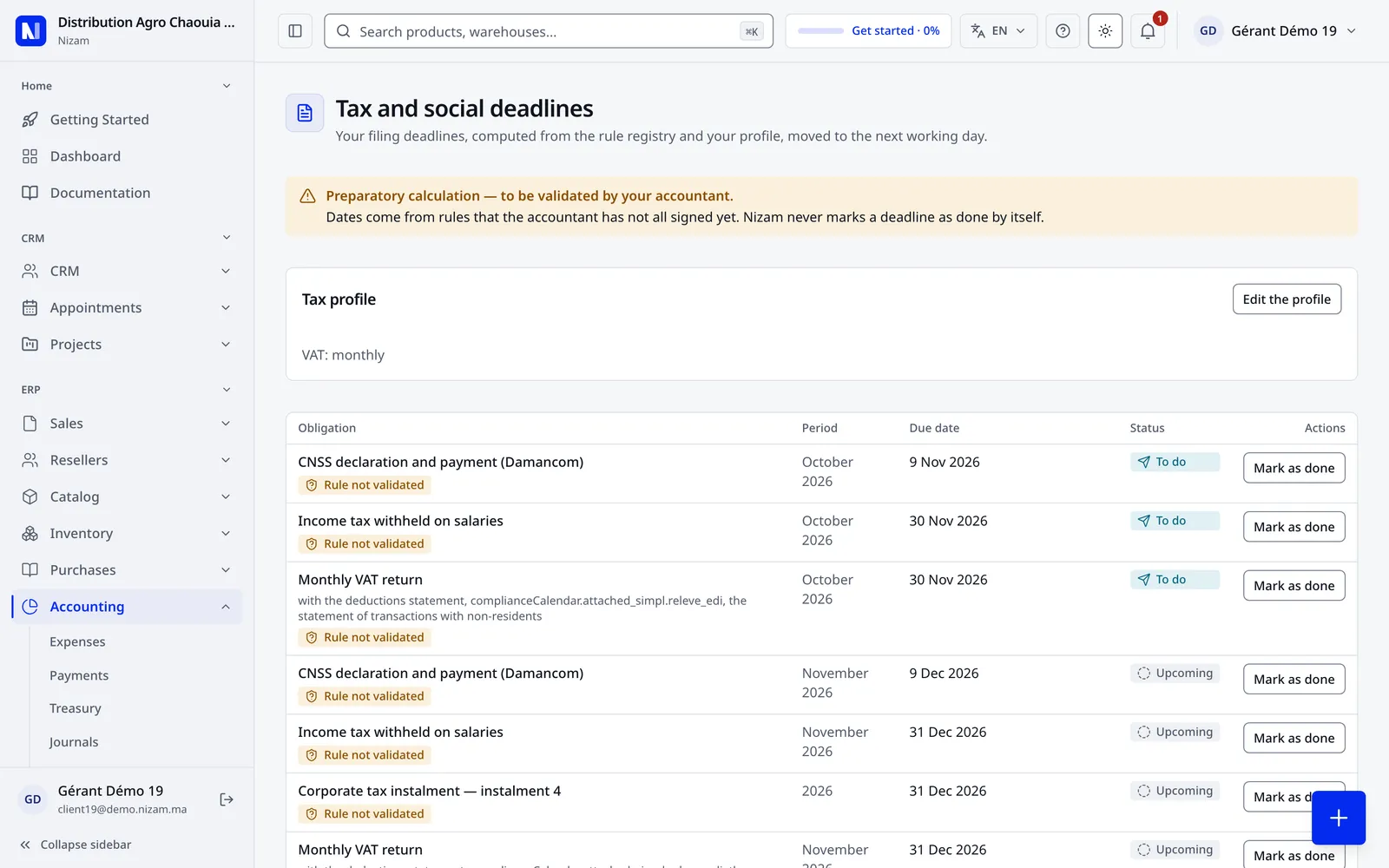
A calendar of your tax and social deadlines, built from your profile; dates to be validated by your accountant. Each obligation shows its period, its due date and its status.
Demo on request · Pricing on request · Guided setup
Dates tracked from memory
A paper diary, reminders from the accountant, surcharges discovered too late.
- Each obligation has its own frequency, hard to follow
- Nobody knows whether this month’s return was actually filed
- The firm and the company do not look at the same calendar
Your company’s obligations
Accounting › Deadlines lists each obligation with its period, due date and status. The obligations shown depend on your profile:
- VAT, monthly or quarterly depending on your frequency
- Corporate tax: instalments, return and minimum contribution; or income tax depending on your regime
- Income tax withheld on salaries and CNSS returns
- Fees paid and withholding on services from non-residents
- Payment-terms statement (law 69-21), when it applies to you
- Business tax (taxe professionnelle)
A calendar built from your profile
You state once your tax on profits (corporate or income tax), whether you pay salaries or fees, your services from non-residents, your latest turnover and your start of activity. The VAT regime and frequency come from the company settings.
When a date falls on a non-working day, the move to the next working day is shown. A date that depends on an estimated public holiday is marked « Provisoire » (provisional).
Clear statuses, and nothing ticked for you
Each deadline is upcoming, to do or late. It only becomes « done » when someone on your team marks it, once the return or payment has been made: Nizam never ticks it by itself, and the name and date are recorded.
Until it is done, Nizam reminds you: an in-app notice and a digest e-mail a few working days before the date (3 by default; each person sets the lead time and channel in their profile), then once if it becomes late. Every reminder says the date is to be validated by your accountant.
The same calendar for your firm
When your firm follows your file on Nizam Cabinet, it sees the same calendar. It is notified in its workspace of deadlines that are close or late, with a daily summary of what is new in its files.
Dates to be validated by your accountant
Dates come from a registry of tax rules, each with its source. Until a chartered accountant signs a rule, the screen shows « Règle non validée » (rule not validated). It is a preparatory calculation: check each date with your accountant before relying on it.
Pricing
On request: our pricing depends on your modules, number of users and the support you need.
Frequently asked questions
Which deadlines appear in the calendar?
Those of your profile: VAT, corporate tax instalments and return or income tax, minimum contribution, income tax withheld on salaries, CNSS, fees, withholding on services from non-residents, payment terms (law 69-21) and business tax.
Are the dates shown guaranteed?
No. It is a preparatory calculation from sourced rules, some of which a chartered accountant has not signed yet: the screen says so with « Règle non validée ». Check each date with your accountant.
Does Nizam file my returns?
No. Nizam lists the deadlines and prepares some figures, such as VAT and payment terms. The return and payment are made outside Nizam, by you or your accountant; you then mark the deadline as done.
Does my firm see my deadlines?
Yes, if it follows your file on Nizam Cabinet with access you granted. It sees the same calendar as you and is notified of deadlines that are close or late.
See the deadlines of your year
Request a demo with your profile: VAT regime, salaries, corporate or income tax.